We have compiled a list of manufacturers, distributors, product information, reference prices, and rankings for Comparison Software.
ipros is IPROS GMS IPROS One of the largest technical database sites in Japan that collects information on.

Comparison Software(pdf) - List of Manufacturers, Suppliers, Companies and Products | IPROS GMS

Last Updated: Aggregation Period:Jul 22, 2026~Aug 18, 2026
This ranking is based on the number of page views on our site.

Comparison Software Product List

1~9 item / All 9 items

Displayed results

Tool "Kaleidoscope"

Render source code visually appealing and easy to read! Equipped with multiple built-in themes.

"Kaleidoscope" is a powerful tool for finding differences between text and image files, or folders containing files. It adds relevant context when resolving merge conflicts from Git, making it easier to understand complex merge tasks. Please feel free to contact us if you need assistance. 【Features】 ■Git Merge Context ■Git File History ■Syntax Coloring ■Comparison to Merge ■Text Filters ■Kaleidoscope Prism *For more details, please refer to the PDF document or feel free to contact us.

  • Company:B7
  • Price:Other
  • Software (middle, driver, security, etc.)
  • Comparison Software

Added to bookmarks

Bookmarks list

Bookmark has been removed

Bookmarks list

You can't add any more bookmarks

By registering as a member, you can increase the number of bookmarks you can save and organize them with labels.

Free membership registration

File comparison software "Diff Doc"

It is an easy-to-use file comparison tool.

"DiffDoc" is software that can compare two files, such as Word files and PDF files, and detect differences.

  • others
  • Document and Data Management
  • Comparison Software

Added to bookmarks

Bookmarks list

Bookmark has been removed

Bookmarks list

You can't add any more bookmarks

By registering as a member, you can increase the number of bookmarks you can save and organize them with labels.

Free membership registration

Multi-page file automatic drawing comparison PloCVAuto

We will accurately and efficiently mark changes made to many drawings contained in a multi-page file.

A product's drawings are typically composed of many drawings and are contained in files such as multi-page PDFs. When there is a design change, comparing all the drawings of the old and new versions and marking the changes is a labor-intensive task. PloCVAuto automatically performs the comparison of the large number of drawings contained in the two multi-page files.

  • Other CAD related software
  • Comparison Software

Added to bookmarks

Bookmarks list

Bookmark has been removed

Bookmarks list

You can't add any more bookmarks

By registering as a member, you can increase the number of bookmarks you can save and organize them with labels.

Free membership registration

Vector/Image Conv PloCompAuto

Overlap files, or find change areas and convert continuously.

PloCompAuto stacks multiple drawing files, such as those for printed boards, into one drawing and automatically converts it into files such as PDF and TIFF at high speed. It also compares the drawings of two drawing files and automatically and continuously determines the areas to be changed. PloCompAuto will be a very effective tool for electronic library, PDM system construction, or design change management.

  • Data conversion software
  • Comparison Software

Added to bookmarks

Bookmarks list

Bookmark has been removed

Bookmarks list

You can't add any more bookmarks

By registering as a member, you can increase the number of bookmarks you can save and organize them with labels.

Free membership registration

HPGL/Vector/Image Viewer PloComp

PloComp is HPGL/Vector/Image viewer, converter and comparator.

PloComp is viewer for viewing drawing which works on Windows PC. PloComp reads plural HPGL/Vector/Image files and PloComp piles up or arranges drawing, and displays it. And, old and new drawing comparison can be performed by recognition of different colors and change area by cloud mark. PloComp has highly efficient drawing edit function like 2D-CAD, it diverts design drawing and can create drawing of another use easily. Drawing comparison video ... https://youtu.be/AunDSJ6xVvI

  • Other CAD related software
  • Comparison Software

Added to bookmarks

Bookmarks list

Bookmark has been removed

Bookmarks list

You can't add any more bookmarks

By registering as a member, you can increase the number of bookmarks you can save and organize them with labels.

Free membership registration

Web Comparison System

This is a product that allows for easy automatic comparison of old and new drawings and documents.

The web comparison system enables high-performance drawing and document comparisons. - It allows for the comparison of PDF/TIFF drawings, automatically comparing scanned drawings or drawings with different page counts. - It is also possible to compare documents such as Excel, Word, DocuWorks, and PDF, and generate a list of discrepancies. - This is an on-premise product used as an internal system. - Since files are not sent to the cloud, security is assured. - It can be used with just a web browser on a PC, and no software installation is required. - It is also possible to use the trial version for business purposes to measure effectiveness. *For more details, please download the PDF or feel free to contact us.*

  • Other information systems
  • Comparison Software

Added to bookmarks

Bookmarks list

Bookmark has been removed

Bookmarks list

You can't add any more bookmarks

By registering as a member, you can increase the number of bookmarks you can save and organize them with labels.

Free membership registration

[For Medical Use] Update of Clinical Guidelines with 'Old and New Document Word Version'

A tool for generating comparison tables of old and new Word documents to support the update of clinical guidelines.

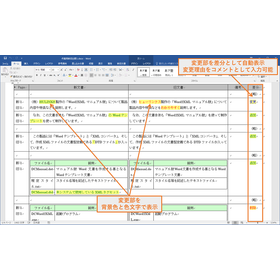
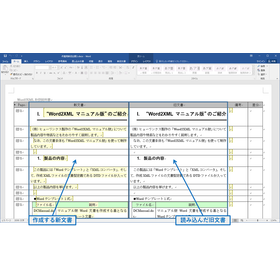
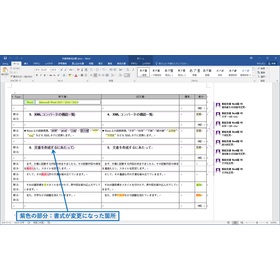
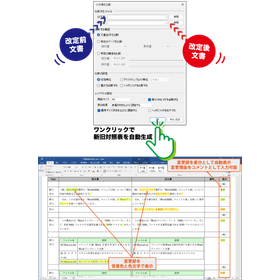
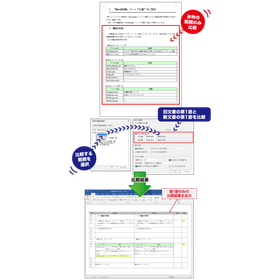
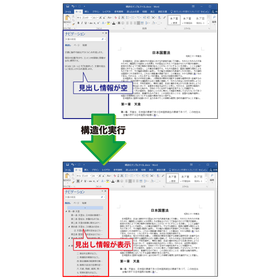
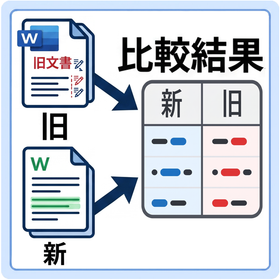
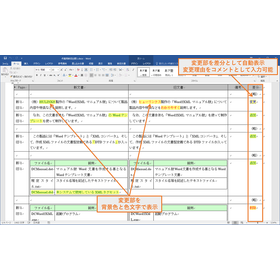
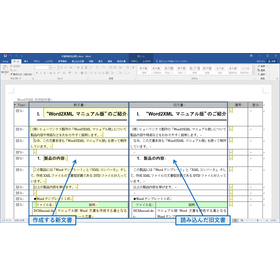
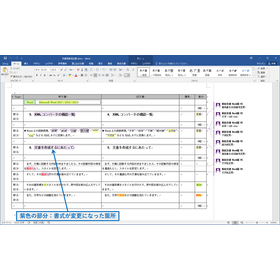
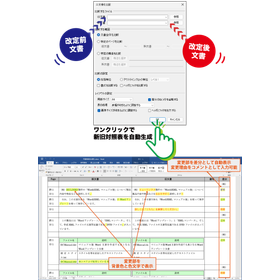
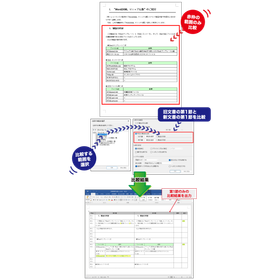
In the medical industry, particularly in the updating of clinical guidelines, accurate comparisons with past records and the reflection of the latest information are required. Changes in guidelines directly affect the quality of patient care and the judgment of healthcare professionals, making it crucial to clearly understand even the slightest differences. Inadequate updates may increase the risk of medical errors. Our product, "Old and New Document Word Version," supports the comparison of old and new Word documents and generates a comparison table that lists changes, contributing to the improvement of accuracy and efficiency in the updating of clinical guidelines. 【Usage Scenarios】 - Revision of clinical guidelines - Comparison and verification of past guidelines with the latest version - Recording and sharing of changes - Comparison of PDF-formatted guidelines 【Benefits of Implementation】 - Rapid identification and verification of changes - Reduction of work time and increased efficiency - Decrease in the risk of medical errors - Facilitation of information sharing among stakeholders

  • Shinkyu_01.png
  • Shinkyu_02.png
  • Shinkyu_03.png
  • 202504_oan_w_01.png
  • 202505_oan-03.png
  • 202505_oan-04.png
  • Catalog and manual creation
  • Document and Data Management
  • Comparison Software

Added to bookmarks

Bookmarks list

Bookmark has been removed

Bookmarks list

You can't add any more bookmarks

By registering as a member, you can increase the number of bookmarks you can save and organize them with labels.

Free membership registration

Multi-page file compar PloCVAuto

PloCVAuto automatically compares two multi-page drawing files.

A single product drawing consists of many drawings and is generally stored in a multi-page PDF file. When the design of the drawing is changed, it will be a lot of work to compare all the drawings of the old and new drawings and mark the change accurately. PloCVAuto automatically compares a large number of drawings contained in two new and old multi-page files.

  • Other CAD related software
  • Comparison Software

Added to bookmarks

Bookmarks list

Bookmark has been removed

Bookmarks list

You can't add any more bookmarks

By registering as a member, you can increase the number of bookmarks you can save and organize them with labels.

Free membership registration

Word version of the old and new documents for the renewal of the contract for real estate.

Generation of a comparison table for updating real estate contracts efficiently.

In the real estate industry, the process of updating contracts requires an accurate comparison with past contract contents and a clear understanding of changes. In particular, modifications to clauses due to legal reforms or market changes, as well as the addition or deletion of special provisions, necessitate careful verification to prevent misunderstandings and disputes. Creating a new contract that accurately reflects the contents of the old contract while incorporating the latest terms is a process that demands time and effort. The "Old and New Document Word Version" operates as a Microsoft Word plugin and addresses this challenge. By simply loading the old and new contracts, it automatically generates a visually clear "comparison table" highlighting the changes. This streamlines the verification process of contract contents and supports improved accuracy in contract renewal tasks. 【Usage Scenarios】 - Confirming changes in conditions during the renewal of lease agreements - Identifying additions or deletions of special provisions in sales contracts - Comparing amendments in important matter explanation documents and contract clauses 【Benefits of Implementation】 - Reduces the time spent on verification tasks during contract updates - Prevents oversight of changes and enhances the accuracy of contract contents - Supports rapid responses to legal reforms and changes in internal regulations

  • Shinkyu_01.png
  • Shinkyu_02.png
  • Shinkyu_03.png
  • 202504_oan_w_01.png
  • 202505_oan-03.png
  • 202505_oan-04.png
  • Catalog and manual creation
  • Document and Data Management
  • Comparison Software

Added to bookmarks

Bookmarks list

Bookmark has been removed

Bookmarks list

You can't add any more bookmarks

By registering as a member, you can increase the number of bookmarks you can save and organize them with labels.

Free membership registration

Search Keywords Related to Comparison Software